
Unlocking the POWER of Mixing with Headphones: 🎵🎶🎵 The game-changing technique used by top producers [003]
How a headphone EQ and virtual mixing room plug-in can change the way you mix with headphones.

Hi there,
If you're like me, you love producing music with headphones. Something about the intimacy and isolation of headphones makes you feel closer to your music and more focused on your craft when dialling in reverb or other effects.
But you also know that not all headphones are created equal. Some have too much bass, some have too little treble, and some have weird peaks and dips in the frequency response. And that can affect your mixing and mastering decisions and, ultimately, the quality of your music.
That's why I want to share the two tools that changed my headphone experience forever. I use this software every day to calibrate my headphones and create a stunning sound experience that sounds amazing.
Before I discovered these tools, I was struggling with my headphone mixes. I constantly switched between different headphones and speakers and was never satisfied with the results. I felt like I was missing something; I was not hearing the actual sound of my music.
But then I learned about Headphone EQ and Virtual Mixing Rooms, and everything changed.
Headphone EQ
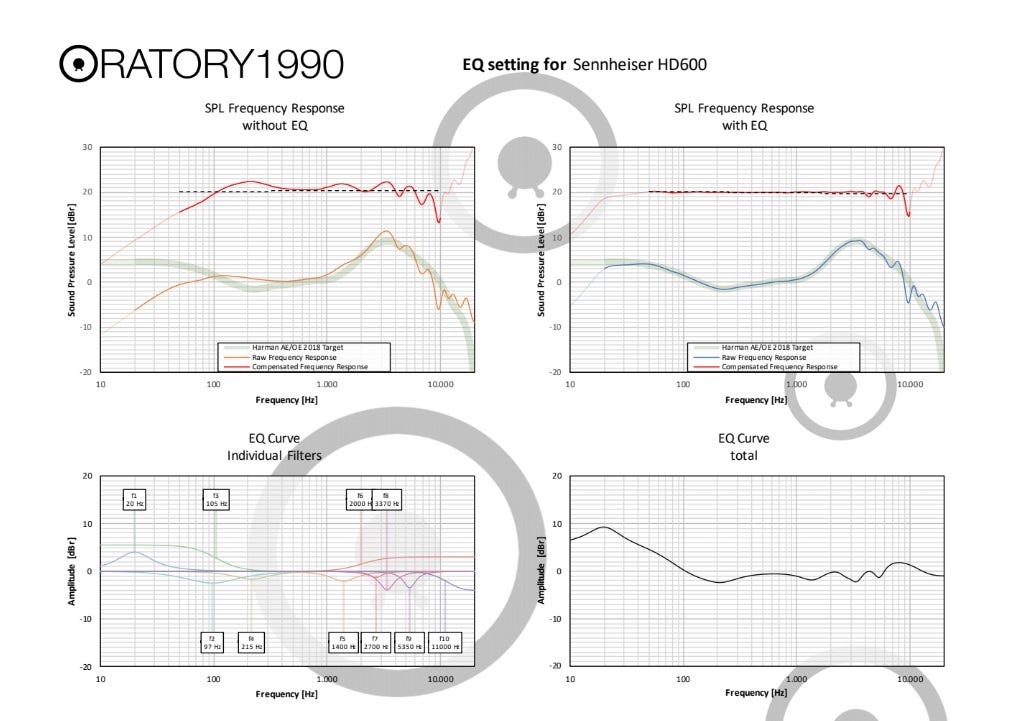
I use DMG Equilibrium Equalizer as a Headphone EQ, one of the best, most powerful and flexible EQ plug-ins. I use this EQ to calibrate my headphones and make them sound more neutral and accurate.
How do I do that? Well, I use the EQ data from Oratori 1990, a user who has measured and calibrated hundreds of headphone models. He has shared his EQ presets for free on Reddit, and you can download the PDFs and enter the EQ data into the DMG Equilibrium Equalizer. This way, you can correct the frequency response of your headphones and make them sound more balanced and natural.
Virtual Mixing Room
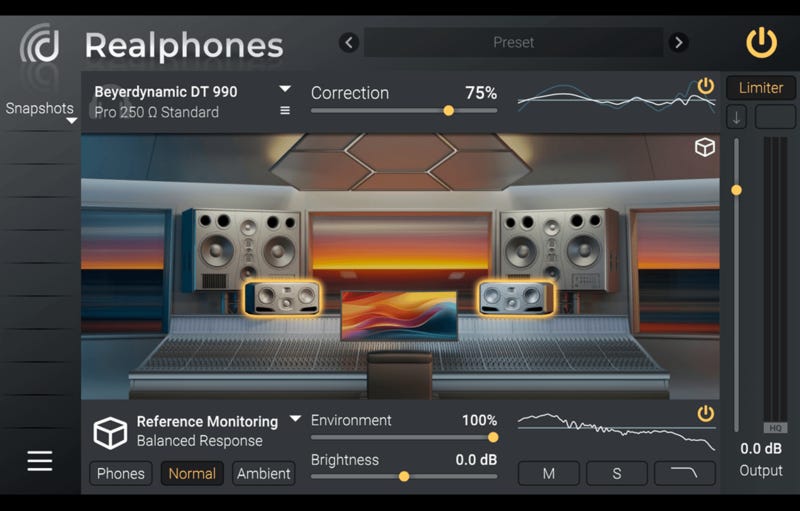
The second software is dsoniq Realphones, a plug-in that recreates the sound of various studio monitors and mixing rooms using advanced binaural technology, which can enhance the realism and immersion of the sound on headphones. This software I use as a virtual mixing room gives me a reference point and a different perspective on my music productions.
How do I do that? Well, I use the 'Big Fat Bottom' live preset, which is one of my favourite presets for bass-heavy music. This preset gives me a warm and punchy sound with lots of low-end energy, which is perfect for my taste.
With this combination of software, I can get the best sound out of my headphones and confidently work on my music. I don't have to worry about the flaws or limitations of my headphones because I know they are calibrated and optimized for my music.
And I don't have to rely on just one sound source because I can switch to a virtual mixing room and hear how my music sounds on different speakers and environments.
Of course, you can also use a different EQ to tweak your sound with an equaliser, whether the internal EQ of Ableton, FL Studio, or the Fabfilter Pro-Q.
I have described the whole process in more detail here.
Pro Tip: Use A Proper Headphone Amp
Before I wrap up this email, I want to give you one more tip to improve your headphone experience. And that is to use a proper headphone amp.
What is a headphone amp? It's like a power booster for your headphones. Some headphones require more power than others to produce optimal sound, and that's where a headphone amp comes in handy.
Not only can a headphone amp make the sound louder and more precise, but it also enhances the details and realism of the sound. This means you'll be able to hear every little nuance in your music, making for a truly immersive listening experience.
I highly recommend getting a good headphone amp if you want to experience the full potential of your headphones. It can make a world of difference in terms of sound quality. Who doesn't want their music to sound even better, right?
So, there you have it. These two tools and one piece of hardware changed my headphone experience forever. I hope you found this email helpful and informative.
If you do, please let me know how they work for you and how they affect your music. I'd love to hear your feedback and stories, just use the substack comment function to get in touch by answering this email.
Thank you for reading this email, and until next time, happy mixing and mastering!
Cheers, Marcus
Mastrng.com - Electronic Music Mixing and Mastering

Start Mixing Mastering